

In the fast-paced world of futures trading, one of the most important things you can do is control your risk and secure your profits. That’s where stop-loss and take-profit orders come in. These two tools give traders a way to define how much they’re willing to lose on a trade, and how much they’re aiming to gain. By setting these levels in advance, you avoid emotional decisions and stick to your plan even when the market gets volatile.
In this guide, we’ll break down what stop-loss and take-profit orders are, how they work in the futures market, and how you can use them to become a more consistent trader.
Key Takeaways
- A stop-loss order (SL) helps limit losses by exiting a position once it hits a specific price level.
- A take-profit order (TP) automatically closes a trade at a preset profit target.
- Using both orders together helps futures traders manage risk and stick to their trading plans.
- Stop-loss and take-profit orders are essential for leveraged trading, where small price moves can lead to large gains or losses.
What is a Stop-Loss Order?
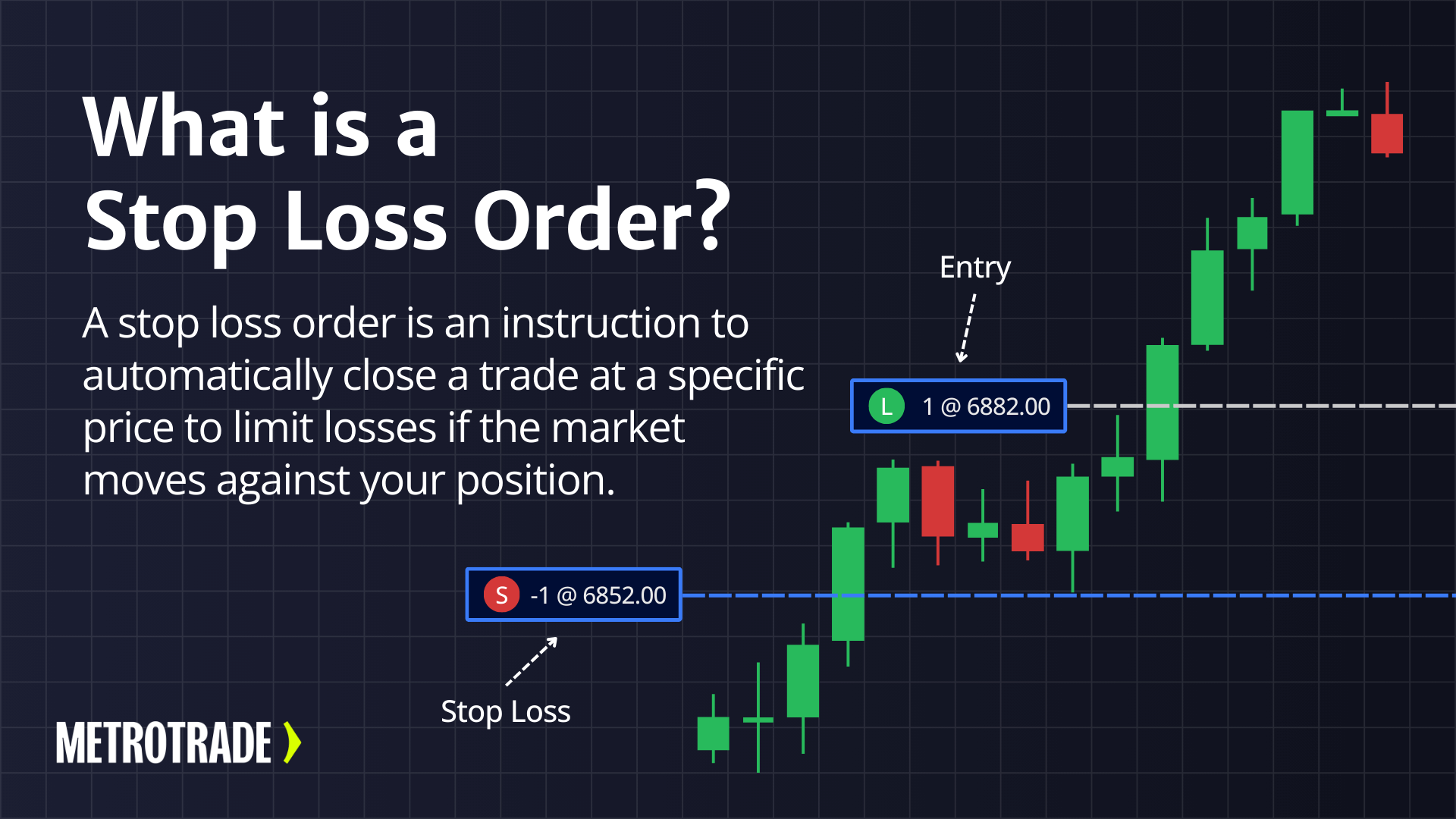
A stop-loss order is a risk management tool that automatically closes a trade if the market moves against you. It’s designed to limit how much money you can lose on a single trade.
When you place a stop-loss, you’re setting a specific price where your position should be closed to prevent further loss. If the market reaches that price, your broker turns your stop-loss into a market order, which sells or buys the contract to exit your position.
Types of Stop-Losses
- Fixed Value: Set a dollar amount or a number of ticks you’re willing to lose.
- Percentage-Based: Exit the trade if the contract moves a certain percentage against you.
Example: Micro E-mini S&P 500 (MES)
Let’s say you go long on the MES at 6000. You decide to place your stop-loss at 5985. If the market drops to 5985, your stop order triggers, and your position is exited at the best available price. You’ve limited your risk to 15 points, or $75 per contract.
A well-placed stop-loss can prevent a small loss from turning into a much bigger one.
What Is a Take-Profit Order?
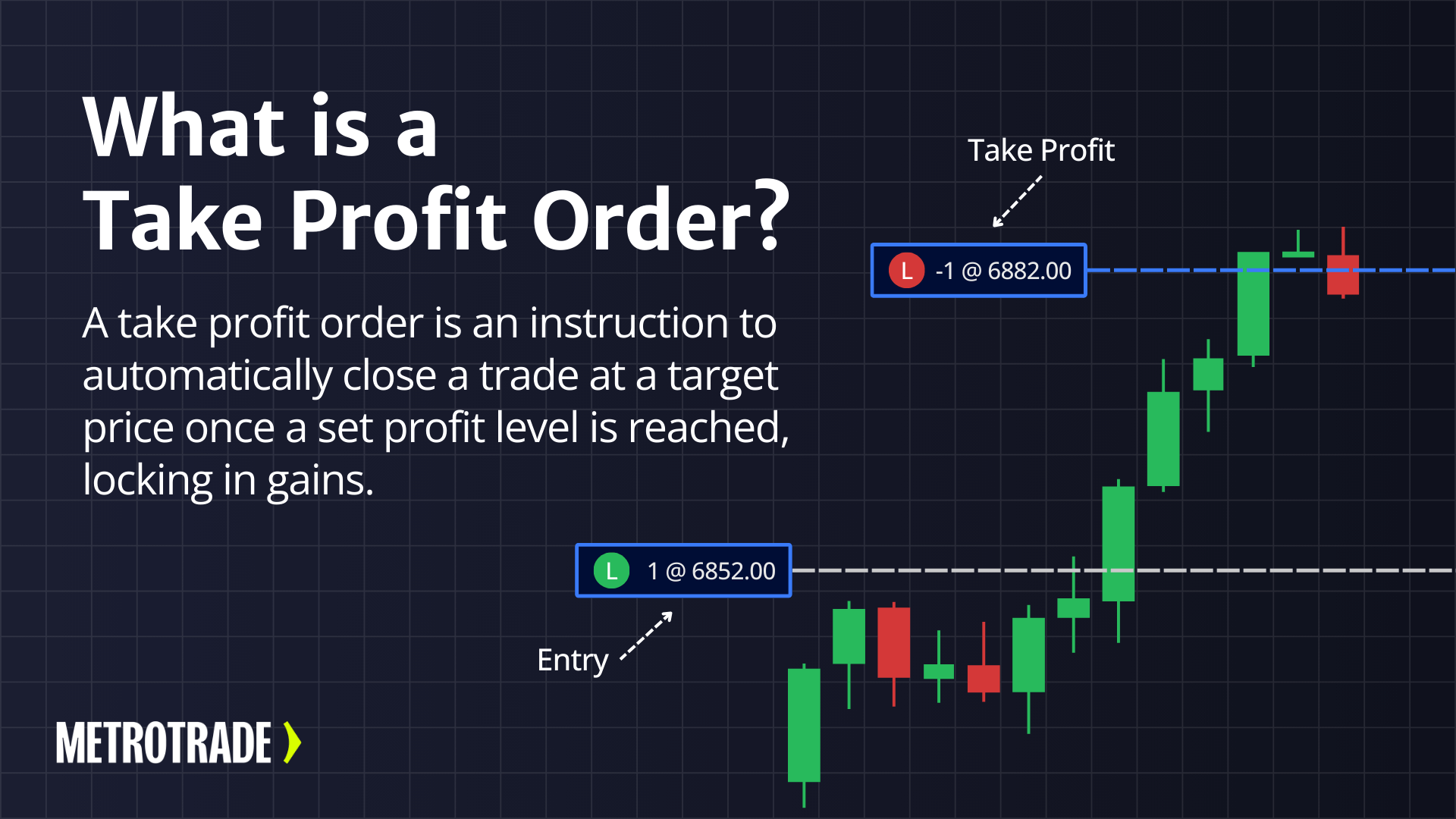
A take-profit order, also called a limit order, is used to lock in profits once a trade hits a target price. It tells the broker to close your position when the market reaches your desired exit level.
Unlike a stop-loss, which becomes a market order when triggered, a take-profit order executes only at your chosen price or better.
Example: Micro Crude Oil (MCL)
You go short on MCL at $75.00 and set a take-profit order at $73.50. If the market drops to $73.50, your position is closed, and you realize a $1.50 gain, which is worth $150 per contract.
Take-profit orders help you exit winning trades automatically, especially when you’re not watching the market.
Why Both Orders Matter in Futures Trading
Futures contracts are highly leveraged. That means you can control a large notional value with a relatively small margin deposit. While that gives you the chance to earn higher returns, it also means losses can grow quickly.
Using stop-loss and take-profit orders together is key to managing risk and reward. These orders:
- Limit downside risk
- Lock in profits before the market reverses
- Remove emotion from trading decisions
- Help enforce consistent risk management
If you trade without either order, you’re leaving your results to chance. The market doesn’t care what you hope will happen. These tools make sure you act on your plan, not your feelings.
How to Set a Stop-Loss in Futures
A good stop-loss protects you from major losses without forcing you out of trades too early. There’s no one-size-fits-all method, but the goal is the same: set a level that respects market structure while keeping your risk manageable.
1. Use Support and Resistance
Look for recent swing highs and lows or key price levels on the chart. If you’re going long, place your stop below support. If you’re shorting, place it above resistance. This gives the trade some breathing room while still limiting your downside.
2. Consider Market Volatility
In fast-moving or news-driven markets, price swings can be larger than usual. If you place your stop too close, you might get taken out by normal noise. On the other hand, wide stops can risk more than you’re comfortable with. Adjust your stop to match current conditions instead of using fixed distances.
3. Set a Dollar or Tick Value
Decide how much you’re willing to risk on a trade and convert that into ticks or points for the contract you’re trading. For example, if you’re trading Micro E-mini Nasdaq (MNQ) and are willing to risk $50, you can divide that by the tick value to determine your stop distance.
4. Match Your Risk Tolerance
Never risk more than you can afford to lose. Many traders only risk a certain percentage of their account on any single trade. This keeps losses small enough to recover from.
The key is to combine technical context, market conditions, and personal risk limits when choosing your stop level. It’s not about avoiding all losses, but about making sure they’re controlled.
How to Set a Take-Profit in Futures
A take-profit level should reflect a realistic target based on how the market is moving, not just a random number. It’s about knowing where to exit if the trade goes your way, while keeping your reward-to-risk ratio in check.
1. Use Key Price Levels
Look for recent highs and lows, resistance zones, or areas where the market has reversed in the past. These levels often act as natural places for traders to take profit, so setting your target just before one can improve your chances of getting filled.
2. Align with Your Risk
Many traders use reward-to-risk ratios to guide their targets. A common goal is a 2:1 or 3:1 ratio. If your stop-loss is $100, aim for $200 or $300 in potential profit. This way, you don’t need to be right on every trade to come out ahead over time.
3. Factor in Market Conditions
If the market is slow or stuck in a tight range, smaller targets may be more realistic. In strong trends or high-volatility sessions, a wider take-profit may be achievable. Your target should reflect what the market can reasonably deliver.
4. Use Bracket Orders to Lock It In
The easiest way to set a take-profit is to include it in your initial order using a bracket setup. This way, you define both your stop and your profit target at the same time, removing the need to babysit your trade.
Think of take-profit orders as part of your overall game plan. You’re not just hoping for the market to move — you’re giving it a clear destination that matches your setup.
Example: How to Use Stop-Loss and Take-Profit Orders in a Futures Trade
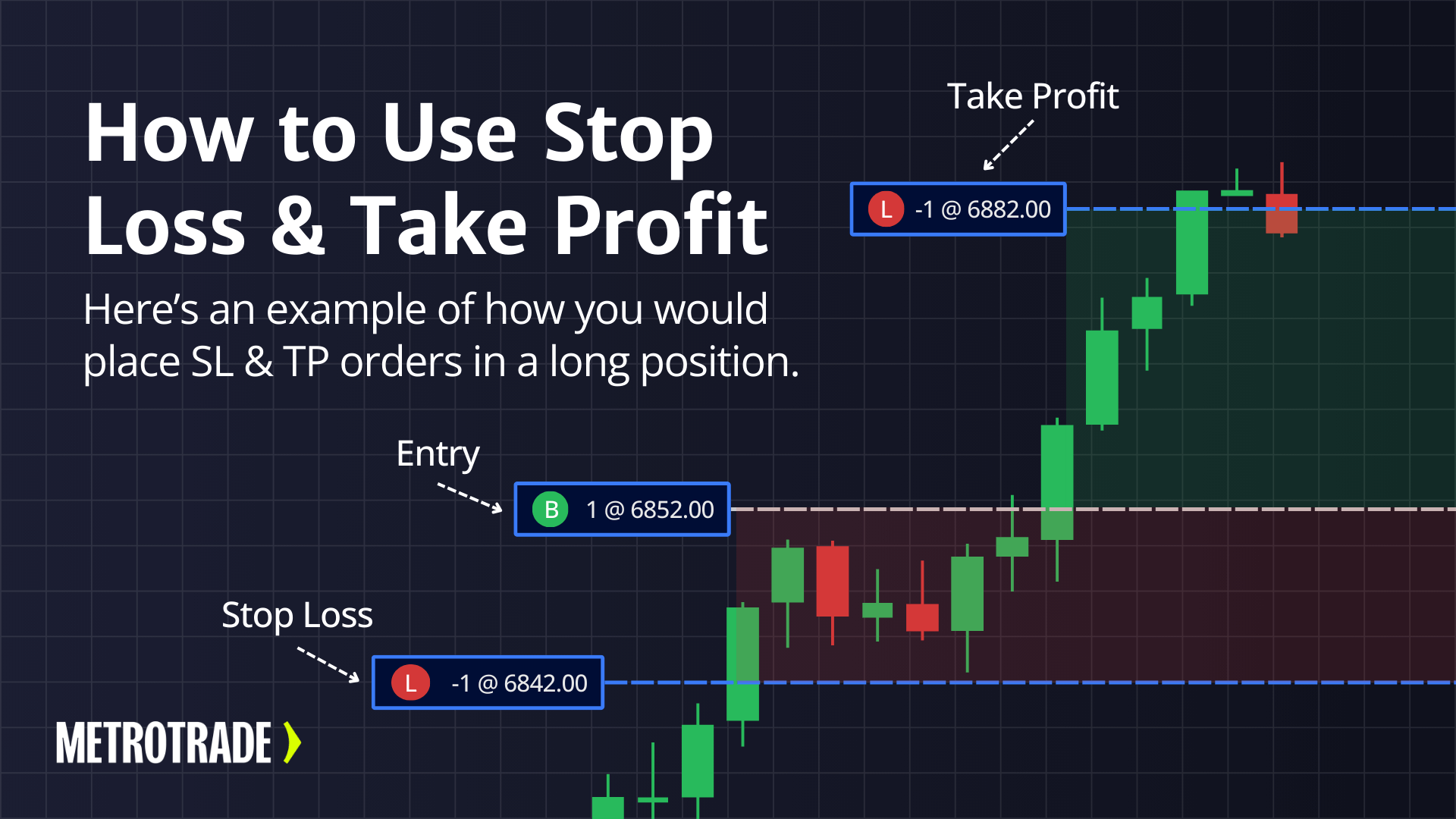
When trading futures, it’s important to define both your risk and your profit target before entering a position. One of the easiest ways to do that is by placing a stop-loss and take-profit order at the same time you enter the trade.
The graphic above shows a simple example of how this works in a long position. In this setup:
- Entry is placed at 6852.00, where the trader buys 1 contract.
- Stop-loss is set below the entry, ready to exit the trade automatically if the market falls to a predefined loss level.
- Take-profit is set above the entry, closing the trade once the market hits a target price to lock in gains.
This type of structure creates a clear trading plan: you know exactly how much you’re risking and how much you stand to gain. By using both orders together, you remove emotion from your decision-making and let the market do the work. Whether the price goes up or down, your exit is already in place.
MetroTrader supports bracket orders like this, making it easy to define your stop and target right from the start of the trade.
Start Trading Futures Today
Complete your live trading application and start trading futures with as little as $100.
Stop-Loss and Take-Profit Order Types
Futures platforms give you multiple ways to structure your exit orders. Choosing the right type helps you manage how trades are executed, especially in fast-moving markets where precision matters.
- Market Order: Executes immediately at the best available price. stop-loss orders often become market orders once the trigger price is reached.
- Limit Order: Executes only at your specified price or better. take-profit orders are typically placed as limit orders to secure gains at a set level.
- OCO (One Cancels the Other): Links a stop-loss and a take-profit order together. When one fills, the other is automatically canceled, ensuring only one exit occurs.
- Bracket Order: Combines entry, stop-loss, and take-profit into one setup. This allows you to manage risk and reward from the moment you enter the trade.
- Trailing Stop Order: Moves your stop price in the direction of a favorable trade. If the market reverses, the stop holds its last position and exits the trade to protect gains.
Each of these order types has its place, depending on your strategy and how hands-on you want to be. Mastering how and when to use them helps you trade with more structure and fewer surprises.
Common Mistakes to Avoid
Even with the right tools in place, many traders still misuse stop-loss and take-profit orders. Here are some of the most common pitfalls to watch out for.
- Setting Stops Too Tight: Placing your stop-loss too close to your entry often leads to getting stopped out on normal market noise. It can prevent the trade from having enough room to develop.
- Skipping the take-profit: Some traders forget to set a profit target and try to “let it ride.” Without a clear exit plan, it’s easy to let winning trades slip away.
- Moving Stops Emotionally: Adjusting your stop-loss mid-trade because you’re hoping the market will turn is a fast way to take bigger losses. Your stop should be based on logic, not emotion.
- Ignoring Market Conditions: Using the same stop and take-profit levels in all market environments is risky. Volatile markets need wider buffers, while quiet sessions may call for tighter setups.
- Trading Without Either: Entering a trade with no defined exit puts your capital at unnecessary risk. Always plan your stop and target before placing the order.
Mistakes like these don’t just hurt your trades; they also hurt your discipline. Avoiding them can lead to more consistent results over time.
Stop-Loss and Take-Profit Examples by Contract
MES (Micro E-mini S&P 500)
- Entry: 5000 long
- Stop: 4990 (10-point loss = $50)
- take-profit: 5020 (20-point gain = $100)
- Reward-to-risk ratio: 2:1
MCL (Micro Crude Oil)
- Entry: $75.00 short
- Stop: $76.00 (1-point loss = $100)
- take-profit: $73.50 (1.5-point gain = $150)
- Reward-to-risk ratio: 1.5:1
MGC (Micro Gold Futures)
- Entry: $2,400 long
- Stop: $2,390 (10-point loss = $100)
- take-profit: $2,420 (20-point gain = $200)
- Reward-to-risk ratio: 2:1
These examples help visualize how you can plan trades with both protection and targets in place.
Using Risk-Reward Ratios with Stop-Loss and Take-Profit
Risk-reward ratio is the foundation of smart trading.
How to Calculate
If your stop-loss is $100 and your take-profit is $200, your reward-to-risk ratio is 2:1.
Why It Matters
Even if you win only 40% of your trades, you can still be profitable with a 2:1 ratio.
Using Tools
MetroTrade’s risk-reward calculator makes it easy to plan your trades ahead of time. You’ll know exactly what you’re risking and targeting before entering any position.
How These Orders Fit Into a Trading Plan
Stop-loss and take-profit orders aren’t just “nice to have.” They are key parts of a structured trading plan.
When you plan your entries and exits in advance, you take the guesswork out of trading. These orders help you:
- Avoid overtrading
- Stick to your strategy
- Control emotions like fear and greed
- Track your results consistently
Whether you’re scalping micro futures or swing trading major contracts, your plan should always include where you’ll get out and why.
Conclusion
Stop-loss and take-profit orders are essential tools for any futures trader. They help you stay in control of your trades, avoid emotional decisions, and manage your risk and reward with precision.
By using both together, you give yourself the structure needed to trade consistently in a fast-moving market. Whether you’re just starting out or refining your strategy, mastering these orders is one of the most important steps you can take.
Ready to put your plan into action?
Open a live account today and start testing stop-loss and take-profit setups in real time.
Frequently Asked Questions
What is the difference between a stop-loss and a take-profit order?
A stop-loss order limits your downside by exiting a trade when the market moves against you, while a take-profit order locks in gains by closing the trade when a profit target is hit. Both are used to manage risk and reward in futures trading.
Can you use a stop-loss and a take-profit at the same time in futures trading?
Yes, futures traders can use both a stop-loss and a take-profit order on the same trade. This is often done using a bracket order, which defines both the stop and the target at entry.
How do bracket orders work in futures trading?
Bracket orders allow futures traders to set a stop-loss and take-profit at the same time. This helps automate trade management and reduce emotional decision-making.
Should I use a trailing stop-loss in futures trading?
A trailing stop-loss can help lock in profits as the market moves in your favor. However, it may not be ideal in choppy markets where price frequently retraces.
What is a good risk-to-reward ratio when trading futures?
A 2:1 or 3:1 reward-to-risk ratio is commonly used by futures traders. This means your potential profit is at least double your potential loss on each trade.
Can I set stop-loss and take-profit levels after opening a trade?
Yes, you can add stop-loss and take-profit orders after a futures trade is open. However, it’s often more efficient to include them as part of your initial order using a bracket setup.
The content provided is for informational and educational purposes only and should not be considered trading, investment, tax, or legal advice. Futures trading involves substantial risk and is not suitable for every investor. Past performance is not indicative of future results. You should carefully consider whether trading is appropriate for your financial situation. Always consult with a licensed financial professional before making any trading decisions. MetroTrade is not liable for any losses or damages arising from the use of this content.